Timesheets that fill themselves in.
Pre-filled from schedules, leave and the timer.
Submitted in a tap, approved in another.
Stop chasing timesheets every Friday
Spreadsheet timesheets go wrong in the same places every time. Someone forgets a public holiday, someone logs hours on a day they were on leave, and someone in HR spends the end of the month copying numbers between files and asking people to fix them.
FlexDays builds each timesheet from the things the company already knows: the person's work schedule, the public holidays for their location, and every approved leave request. Hours tracked with the time tracker are already in it too. Employees review, adjust and submit. Approvers get a notification and decide in one tap.
It works for a team of 5 or 500, in any country. Your first 10 employees are free, then a flat $2 per employee / month for each one after.
Open it, check it,
submit it.
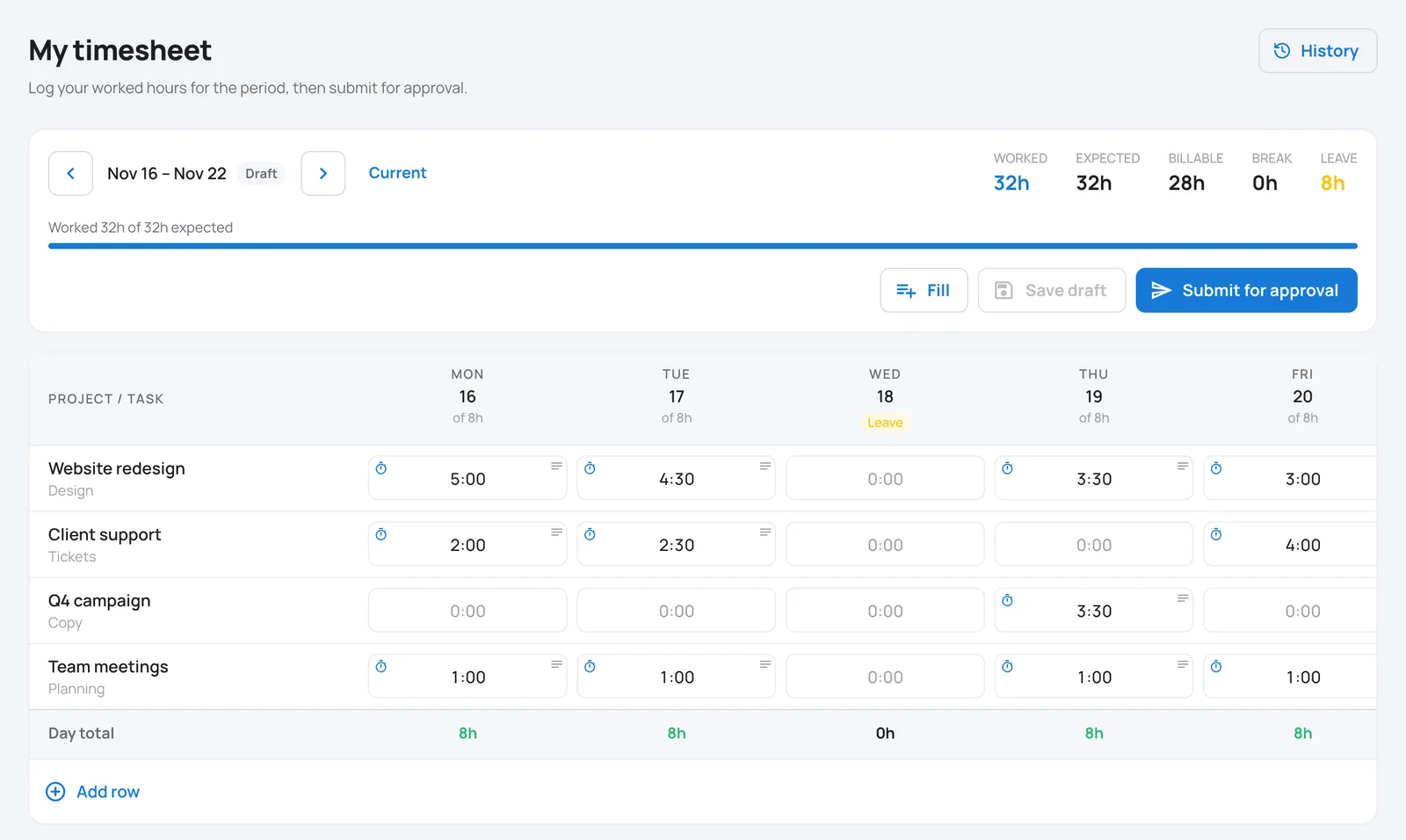
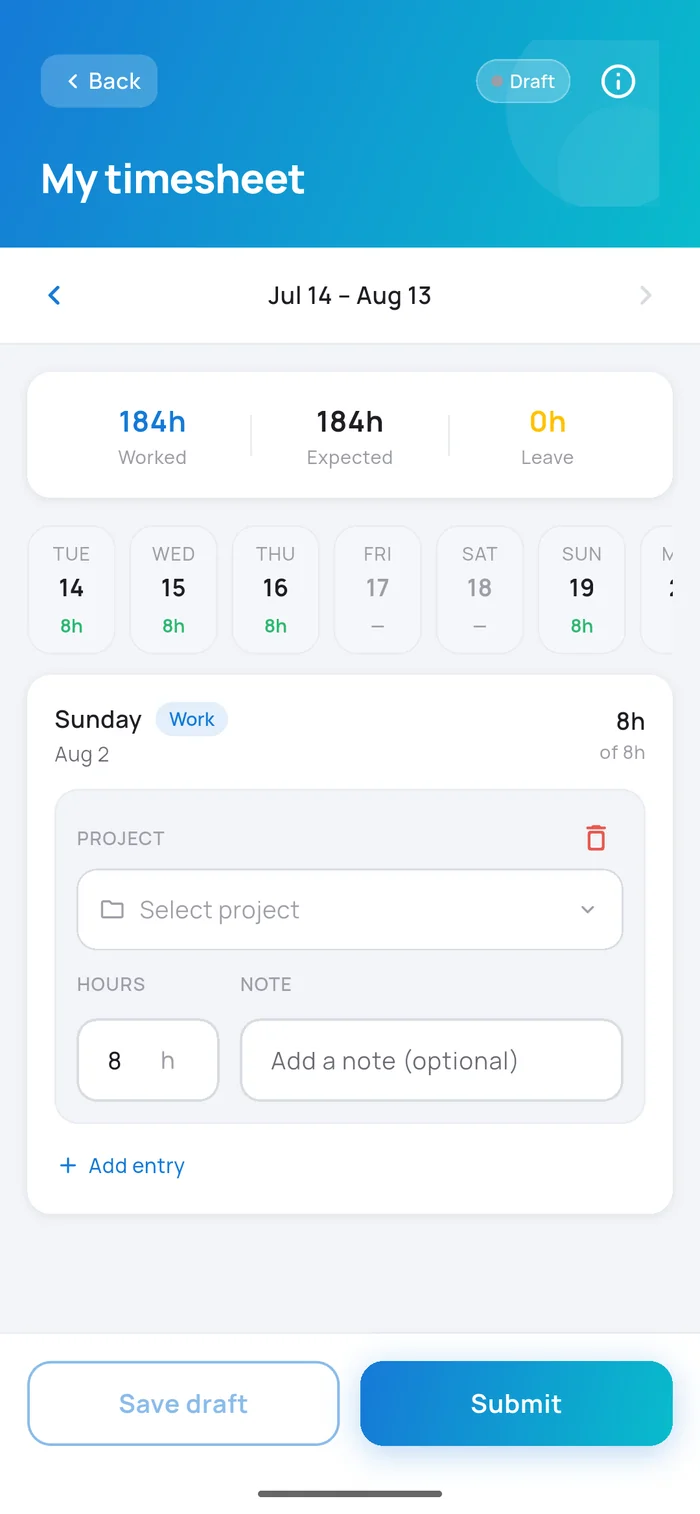
Each timesheet is a simple grid: one row per project or task, one column per day. Expected hours come from the work schedule, leave days are already marked, and time from the timer sits in the right cells.
Expected hours from the schedule
Working days, weekends and daily hours come from the person's location or personal schedule, including part-time.
Leave and holidays already on it
Approved leave, half days and public holidays are marked on the right days, and expected hours drop to match.
Type hours the way you think
7:30, 7.5 or 90m all work. Billable time and breaks are totalled for you.
Leave, schedules and the timer
all feed one timesheet.
Most tools keep these in separate places and leave HR to reconcile them. In FlexDays they are one system, so a timesheet can't disagree with a leave request.
Approved leave
The moment a request is approved, those days show as leave on the timesheet.
Work schedule and holidays
Working days, hours and public holidays by location set the expected hours for each day.
Time tracker
Every timer and time entry lands in the right cell, on the right project.
The timesheet
Ready for the employee to check and submit.
- Expected hours are right for every day
- Leave, half days and holidays already marked
- Tracked time already on its project
- If the schedule or leave changes later, expected hours update on their own
Everything a timesheet should do,
nothing it shouldn't.
Built for employees who want to be done in a minute, managers who want a clean approval queue, and HR who needs numbers they can trust.
Pre-filled from the work schedule
Each new period starts with the hours from the person's schedule, so a regular week needs a glance and a tap. Prefer hours to come only from the timer? Switch on timer-only mode.
Multi-level approvals
Timesheets follow the approval chain you set per team. Approvers approve or reject with a note, the employee is notified either way, and a rejected timesheet goes back to fix and resubmit.
Weekly or monthly periods
Pick weekly periods starting on any weekday, or monthly ones starting on any day. Changes start cleanly when the current period ends.
Projects and tasks
Log hours per project and task, with billable time and breaks totalled on every timesheet.
Fill a week in one click
Copy last period's rows, or its rows and hours, or save the rows you use every week as a template.
Timer time flows in
Time from the tracker is already on the timesheet, and a cell can't drop below what was tracked.
HR stays in control
File a timesheet on someone's behalf, edit hours with a reason, reassign a pending approver, or force approve, reject or reopen a stuck timesheet. The employee is notified every time.
Export for payroll
Download timesheets for any date range to Excel or CSV, filtered by status, ready to hand to payroll or your accountant.
Follows the calendar
If a schedule, holiday or leave changes after a timesheet starts, expected hours update by themselves.
Sensible checks
A day over 16 hours gets a warning before submitting, and no day can hold more than 24.
Locked once approved
Submitted and approved timesheets are locked, so the numbers payroll sees can't quietly change.
Full history
Every timesheet, its status and the approver's note, newest first, for employees and HR.
From blank week to payroll
in four steps.
Set it up once in the web portal. After that, each period runs itself.
Choose your period
Weekly or monthly, starting on the day that suits your payroll.
OnceHours fill in
Schedules, holidays, leave and tracked time pre-fill every timesheet.
AutomaticEmployees submit
A quick check on the phone or the web, then one tap to submit.
About a minuteApprove and export
Approvers get notified, decide in a tap, and HR exports to Excel or CSV.
One tapTimesheet spreadsheet vs. FlexDays
A shared timesheet template is where most teams start. Here's what changes when timesheets live in the same app as leave, schedules and time tracking.
| Spreadsheet | FlexDays | |
|---|---|---|
| Expected hours | Typed in, often wrong on short weeks | From each person's schedule and holidays |
| Leave days | Cross-checked by hand against a leave file | Marked automatically when leave is approved |
| Filling it in | Every hour, every week | Pre-filled, copied or tracked with a timer |
| Approvals | Email threads and reminders | Multi-level approvals with notifications |
| Late changes | Anyone can edit last month | Locked once submitted or approved |
| Payroll hand-off | Merge files and fix formulas | One export to Excel or CSV |
| On mobile | Hard to read or edit on a phone | Native iOS and Android apps |
Questions, answered.
What is timesheet software?
Timesheet software records the hours each employee works in a period, sends them to a manager for approval, and keeps an accurate record for payroll and billing. FlexDays does this in one app on mobile and web, connected to leave, work schedules and a time tracker.
Is there a free timesheet app?
Yes. FlexDays is free for teams of up to 10 employees, with no time limit and no credit card, and every company gets its first 30 days free at any size. After that it's $2 per employee per month, and you only pay for employees beyond the first 10.
Can timesheets be weekly or monthly?
Both. Choose weekly periods that start on any weekday, or monthly periods that start on any day of the month. If you change it later, the new setting starts when the current period ends.
How does leave show up on a timesheet?
When a leave request is approved, those days are marked as leave on the timesheet and the expected hours drop to match. Half days and public holidays work the same way, so nobody has to adjust anything by hand.
Who approves timesheets?
Timesheets follow the approval chain you set for each team, with one or more levels. Approvers get a notification, approve or reject with a note, and the employee is told the decision. HR can also reassign an approver or settle a stuck timesheet.
Can I export timesheets for payroll?
Yes. Export timesheets for any date range to Excel or CSV, optionally filtered by status, and hand the file to payroll.
Does it work with a time tracker?
Yes. FlexDays has a built-in time tracker with a one-tap timer and clock in and out. Tracked time goes straight into the timesheet on the right project and day.
Fair pricing.
No surprises.
Every company gets its first 30 days free, at any size. After that, your first 10 employees stay free. Billing handled securely through Paddle.
- Up to 10 employees
- Leave management & balances
- Timesheet tracking
- One-tap time tracker
- Projects & time reports
- Working schedule configuration
- Multi-country holiday support
- Team-based approvals
- Bulk Excel employee import
- Excel leave balance import
- Mobile app (iOS & Android, arriving this month)
- Everything in Starter
- Scales with your headcount
- No setup fees, cancel anytime
- First 30 days free, whatever your size
- Only pay for employees over 10
One app. Every module connected.
Leave, timesheets, time tracking and company news share the same people, schedules and calendar, so nothing has to be entered twice.
Leave management
Requests in seconds, one-tap approvals, and balances that are always right.
Explore leave You are hereTimesheets
Pre-filled from schedules, leave and tracked time. Submit, approve, export.
Explore timesheetsTime tracker
A one-tap timer on projects, or clock in and out with breaks. Reports included.
Explore time trackingAnnouncements & events
Company news and events to exactly the right people, with a push notification.
Explore announcementsRun your next timesheet in FlexDays.
Create your company, set your schedule and period, and invite your team. Your first 30 days are free at any size, and your first 10 employees stay free after that.
Get started freeAlready have an account? Sign in